
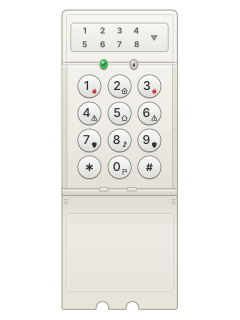
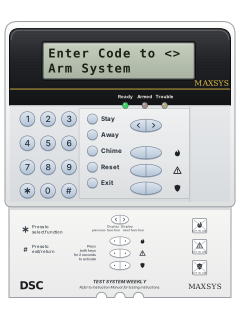
LED5511Narrow LED keypad

DSC Keypads manuals
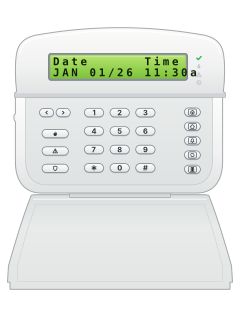
Start hereUsing the LCD5511 KeypadUser guide · 12 pages · 437 KBRead it nowLCD5511 and LED5511 cheat sheet
Arm (away)your codeorhold5
- The green Ready light (tick) must be on. If it's off, close the open doors and windows; an LCD5511 shows which zones when you press [#].
- Key in your code, then leave through your entry/exit door.
- Or hold [5] (the house key) for 2 seconds, if your installer has turned the function keys on.
- The red Armed light comes on once the system has armed.
- Quick arm, if your installer allows it: [*][0] from Ready arms without a code.
Arm while homeyour codeorhold2
- DSC calls this Stay. Key in your code and don't go out the door.
- Or hold [2] (the person-in-a-house key) for 2 seconds, if your installer has turned the function keys on.
- The LCD5511 shows the person-in-a-house symbol while armed in Stay.
- [*][9] then your code arms with no entry delay.
- Want the bypassed zones back on while in Stay? Press [*][1].
Disarmyour code
- Come in through your entry/exit door and key in your code.
- Your code also silences an alarm that is sounding.
- If there was an alarm, the LCD5511 shows the (i) symbol and scrolls the zone numbers.
Bypass a zone*12-digit zone#
- Each detector or door contact is a zone.
- Press [*][1], then key in each zone to bypass as 2 digits: 05 for zone 5.
- Press [#] to finish and go back to Ready.
- The LCD5511 shows the crossed-out door symbol for bypassed zones.
- On an LED5511 the System light comes on; [*][1] lights the numbers of the bypassed zones.
Alarm memory*3
- After an alarm the LCD5511 shows the (i) symbol and scrolls the numbers of the zones that went off.
- Press [*][3] to see the zones in memory.
- On an LED5511 the System light comes on; [*][3] lights the zone numbers.
- Press [#] to go back to Ready.
Chime on or off*4orhold8
- Press [*][4] to turn door chime on, and again to turn it off.
- Or hold [8] (the music-note key) for 2 seconds, if your installer has turned the function keys on.
- The LCD5511 shows a music note for door chime.
Reset smoke detectors*72
- Fire alarm sounding? Key in your code to silence it.
- Press [*][7][2] to reset the smoke detectors.
- The LCD5511's flame symbol means a fire alarm is in memory.
Panic alarmhold7+9orhold1+3orhold4+6
- Hold both keys together for 2 seconds.
- [7]+[9] sends a Panic message, [1]+[3] a Fire message and [4]+[6] an Auxiliary message.
- They only work if your installer has programmed them.
- If your installer has turned on the confirm beep, the keypad beeps once the message is sent.
Set the date and time*6master code1timedate#
- Press [*][6], key in the master code, then [1].
- Key in the time as 4 digits on the 24-hour clock: 1430 for 2:30 pm.
- Then the date as 6 digits, month first (MMDDYY): 28 September 2026 is 092826.
- Press [#] to go back to Ready.
Trouble lights*2
- The LCD5511 shows a triangle for a system trouble. On an LED5511 the System light comes on.
- On an LED5511 that light also means a bypassed zone or an alarm in memory.
- Press [*][2]. Numbers 1 to 8 at the top of the display show which troubles you have.
- Your panel's instruction manual lists what each number means.
- Have any trouble put right by your alarm installer.
Why is my keypad beeping or showing a trouble light?
Most keypads beep or light up a trouble indicator when something needs attention, such as a low backup battery, a power cut or a lost phone or internet connection. Your user guide explains what each light or code means on your model. If it keeps happening, or you are not sure, call your installer or monitoring company.
All DSC Keypads manuals
User guides 1
Installer manuals 4
Nothing here matches that.
Try a shorter search, or search every brand.
More DSC models

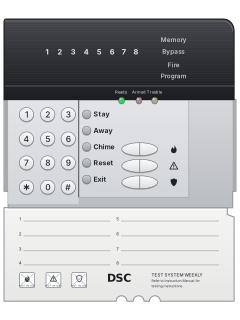
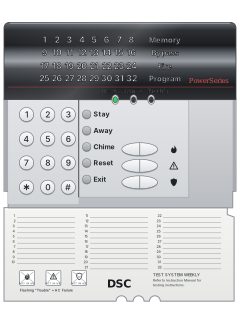
PowerSeries PC5532Z LED keypad, flap open (PC5516Z keys are the same)
PowerSeries PC5010 / PC5020 / 832
21 manuals
Also fitsPC1565, 4 manuals
- Wireless2 user guides, 3 installation manuals and 2 more7 manuals
- Envoy1 user guide, 1 installation manual and 2 more4 manuals
- Impassa1 user guide and 3 installation manuals4 manuals
- PC10001 user guide and 1 installation manual2 manuals
- PC14041 user guide and 1 installation manual2 manuals
- PC20001 installation manual and 1 manual2 manuals
- WLS9001 user guide and 1 installation manual2 manuals
- SCW9045 / SCW90471 installation manual1 manual
- IP & cellular modules1 quick guide, 4 installation manuals and 9 more14 manuals
Is anyone watching your alarm?
An alarm that only makes a noise relies on someone hearing it. A monitored alarm reports to our A1 graded, NZSA approved control room, watched 24/7 by a team that is New Zealand owned and operated. We can monitor most existing alarms, so you may not need a new one. Thinking about a new alarm or security cameras? Ask us for a quote.
Prefer to talk now? Call us on 0800 339 999.
Home: alarm monitoringBusiness: business monitoringInstaller: bureau monitoring

Manuals are the property of their manufacturers and are provided for reference only; their inclusion here does not imply any endorsement by the manufacturer.