
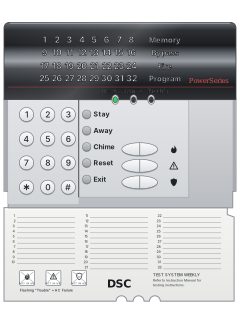
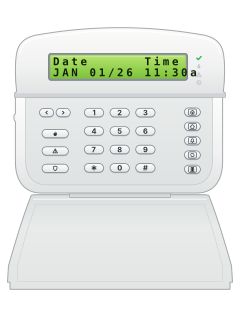
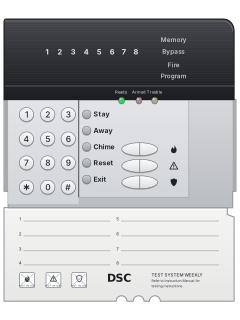
PowerSeries PC5532Z LED keypad, flap open (PC5516Z keys are the same)

DSC PowerSeries PC5010 / PC5020 / 832 manuals
Start herePC5020 (Power864) User's Guide v3.2User guide · 36 pages · 1.4 MBRead it nowKeypad cheat sheet
Arm (away)your codeyour codeorhold5your codeorhold2your codeorholdAwayyour codeorholdthe key with a house on it
- Steps for the wired keypads (open the flap on a PC5516Z/PC5532Z). Close doors and windows and stop movement near motion detectors. The Ready light (a green tick on some keypads) must be on.
- Key in your code. The keypad beeps fast and the Armed light (a padlock on some keypads) comes on.
- Leave by your usual entry/exit door before the exit time runs out. On a PC5020 the keypad beeps once a second, faster for the last 10 seconds.
- When the time is up, the Ready light is off and the Armed light stays on. An LCD keypad shows 'Enter Code to Disarm System'.
- If set up, hold Away for 2 seconds: plain house on PK5500, 2 on PC1555RKZ, 5 on LED5511, or Away under the PC5516Z/PC5532Z flap. Enter your code if asked.
Arm while homeyour codeyour codeorhold2your codeorhold1your codeorholdStayyour codeorholdthe key with a house with a person in it on it
- Steps for the wired keypads (open the flap on a PC5516Z/PC5532Z). If your installer has turned on Stay arming, key in your code and don't go out the entry/exit door.
- If set up, hold Stay for 2 seconds: house with a person on PK5500, 1 on PC1555RKZ, 2 on LED5511, or Stay under the PC5516Z/PC5532Z flap. Enter your code if asked.
- Doors and windows arm; inside zones stay off. PC5516Z/PC5532Z light Bypass; a PC5020 LCD shows 'System Armed in Stay Mode'.
- [*][9] then your code arms with no entry delay (in Stay, on a PC5020). The Armed light flashes to remind you.
- Press [*][1] to arm the inside zones too. Then disarm before you walk past a motion detector.
Disarmyour code
- Steps for the wired keypads (open the flap on a PC5516Z/PC5532Z). Come in through your usual entry/exit door. The keypad beeps, and an LCD shows 'Entry Active'.
- Key in your code before the entry time runs out. The Armed light goes off and the beeping stops.
- Wrong code? A PC5020 buzzes for 2 seconds; key it in again. On a PC5010, press [#] first.
- Alarm by mistake? Key in your code to silence it, then ring your monitoring company.
- Siren going when you get home? Don't go in. Call for help from somewhere safe.
Bypass a zone*12-digit zone#
- Steps for the wired keypads (open the flap on a PC5516Z/PC5532Z). Each detector or door contact is a zone. A bypassed zone can't set off the alarm until you next disarm.
- With the system disarmed, press [*][1]. Key in your code if the keypad needs it.
- Key in the zone as 2 digits: up to 32 on a PC5010, 64 on a PC5020. Its zone light comes on, or an LCD keypad shows a B.
- Key the same number again to undo it. Press [#] to go back to Ready.
- Your installer may have stopped some zones, such as smoke detectors, from being bypassed.
Alarm memory*3
- Steps for the wired keypads (open the flap on a PC5516Z/PC5532Z). After an alarm, a keypad with zone lights flashes that zone's light and the Memory (or System) light for 30 seconds after you disarm.
- An LCD keypad shows 'View Memory' with the zone instead. Scroll with the arrow keys.
- Press [#] to clear the display. Later, [*][3] shows the alarm zones again.
- The memory clears each time the system is armed.
Chime on or off*4*4orhold8*4orhold3*4orholdChime*4orholdthe key with a bell on it
- Steps for the wired keypads (open the flap on a PC5516Z/PC5532Z). Press [*][4]. Three beeps means door chime is on; one long beep means it's off.
- With chime on, the keypad sounds while the system is disarmed as the doors and windows your installer chose open or close.
- If set up, hold Chime for 2 seconds: bell on PK5500, 3 on PC1555RKZ, 8 on LED5511, or Chime under the PC5516Z/PC5532Z flap.
Reset smoke detectors*72*72orhold4*72orholdReset*72orholdthe key with circling arrows on it
- Steps for the wired keypads (open the flap on a PC5516Z/PC5532Z). A pulsing siren is a fire alarm. If there's a fire, or you're not sure, get everyone out.
- No fire? Press [#] to silence it. On a PC5020, [#] works for the first 30 seconds; after that, key in your code.
- Press [*][7][2]. Or, if set up, hold Reset for 2 seconds: circling arrows on PK5500, 4 on PC1555RKZ, or Reset under the PC5516Z/PC5532Z flap.
- A silenced alarm sounds again after 90 seconds without a reset, or after resetting if smoke remains. Your installer may have set it differently.
- Ring your monitoring company if a false fire alarm may have been sent.
Change a code*5master codeuser numbernew code#
- Steps for the wired keypads (open the flap on a PC5516Z/PC5532Z). Press [*][5], then the master code. On a keypad with a Program light, it flashes.
- Key in the 2-digit user number: 01 to 32 for users, 40 for the master code.
- Key in the new 4-digit code (6 digits if your installer set that up). It replaces any code already there.
- To delete a code, key in its number and then [*]. The master code can't be deleted.
- Press [#] to finish.
Set the date and time*6master code1timedate#
- Steps for the wired keypads (open the flap on a PC5516Z/PC5532Z). Press [*][6], then the master code, then [1].
- Key in the time as 4 digits in 24-hour form: 1430 for 2:30 pm.
- Then key in the date as 6 digits, month first (MMDDYY): 28 September 2026 is 092826.
- Press [#] to finish.
- If an LCD keypad shows the time when idle, press [#] first to clear it.
Trouble lights*2
- Steps for the wired keypads (open the flap on a PC5516Z/PC5532Z). A trouble turns on the Trouble light, or the System light on a PC1555RKZ or LED5511.
- The keypad beeps twice every 10 seconds until you press any key. A power cut gives no beeps; on a PC5020 the light flashes.
- Press [*][2] (on a PC5010, disarm first). Zone lights 1 to 8 show the troubles; an LCD keypad shows messages to scroll through.
- For 1, 5, 6 and 7, press that number to see more. On a PC5020 LCD, a * beside a message means press [*] for the rest. Press [#] to leave.
- For 8, set the time and date again. For the rest, the manuals say to call your installer for service.
Pages 5 and 6, 21 and 22 of the PC5020 (Power864) User's Guide v3.2Pages 8, 11 of the PC5010 (Power832) User Manual v2.01 Service needed: press [1] to see which part, such as a low battery or bell circuit 2 Mains power is off 3 Phone line trouble 4 The panel couldn't get through to the monitoring station 5 A zone has a fault: press [5] to see which 6 A zone has been tampered with: press [6] to see which 7 A wireless device has a low battery: press [7] to see which. On a PC5020, press [7] again for handheld keypads, then wireless keys 8 The clock was lost: set the time and date again Send a test signal*6master code4
- Steps for the wired keypads (open the flap on a PC5516Z/PC5532Z). Ring your monitoring company before and after the test.
- Disarm first, with the Ready light on. Press [*][6], the master code, then [4] to run the System Test.
- It sends a test report to your monitoring company, if your installer has programmed one.
- The siren and keypad sound for 2 seconds and every keypad light comes on. Press [#] to leave.
Why is my keypad beeping or showing a trouble light?
Most keypads beep or light up a trouble indicator when something needs attention, such as a low backup battery, a power cut or a lost phone or internet connection. Your user guide explains what each light or code means on your model. If it keeps happening, or you are not sure, call your installer or monitoring company.
All DSC PowerSeries PC5010 / PC5020 / 832 manuals
User guides 7
Installer manuals 14
Nothing here matches that.
Try a shorter search, or search every brand.
More DSC models

- Keypads1 user guide and 4 other manuals5 manuals
- Envoy1 user guide, 1 installation manual and 2 more4 manuals
- Impassa1 user guide and 3 installation manuals4 manuals
- PC10001 user guide and 1 installation manual2 manuals
- PC14041 user guide and 1 installation manual2 manuals
- PC20001 installation manual and 1 manual2 manuals
- WLS9001 user guide and 1 installation manual2 manuals
- SCW9045 / SCW90471 installation manual1 manual
- IP & cellular modules1 quick guide, 4 installation manuals and 9 more14 manuals
Is anyone watching your alarm?
An alarm that only makes a noise relies on someone hearing it. A monitored alarm reports to our A1 graded, NZSA approved control room, watched 24/7 by a team that is New Zealand owned and operated. We can monitor most existing alarms, so you may not need a new one. Thinking about a new alarm or security cameras? Ask us for a quote.
Prefer to talk now? Call us on 0800 339 999.
Home: alarm monitoringBusiness: business monitoringInstaller: bureau monitoring

Manuals are the property of their manufacturers and are provided for reference only; their inclusion here does not imply any endorsement by the manufacturer.